


Many engineering teams don't find the gaps in their Kubernetes backup strategy until they attempt a restore.
The backup jobs may have been completed successfully for months, with scheduled snapshots running as expected. During recovery, however, Kubernetes objects return while the database fails to start because its persistent data cannot be recovered. Elsewhere in the restore path, a Secret may be unavailable, or the recovery cluster may lack the IAM permissions the workload depends on.
At Pelotech, we’ve found that failures like these are rarely caused by backup software alone. They usually expose gaps between what the backup system protects and what the application requires to recover. Those gaps remain hidden when teams validate backup jobs without exercising the complete restore path.
Kubernetes Backup and Restore: What Needs Protecting?
A Kubernetes application does not have a single recovery state. Its configuration may live in Git and the Kubernetes API, while application data resides on persistent volumes or external databases. IAM policies, DNS records, certificates, and other dependencies may exist outside the cluster entirely.
For backup planning, it helps to separate the Kubernetes environment into three layers:
Cluster State
This is the state held by the Kubernetes API, including Deployments, Services, namespaces, ConfigMaps, Secrets, and Custom Resource Definitions (CRDs). Cluster-level protection, such as etcd snapshots, can restore this state, while resource-level backups can support more selective recovery.
Application Manifests
Git provides another recovery source for teams using GitOps. Kubernetes manifests, Helm charts, Kustomize configuration, and related declarative infrastructure can be reapplied to recreate a known application configuration. Git, however, doesn't contain the runtime data generated by stateful workloads.
Persistent Data
Persistent data needs workload-specific protection because it changes independently of Kubernetes configuration. A PostgreSQL database, for example, has different recovery requirements from a stateless API. The recovery process needs to account for data consistency, the available recovery point, and the dependencies that must be restored before the application can start.
The resulting model looks like this:
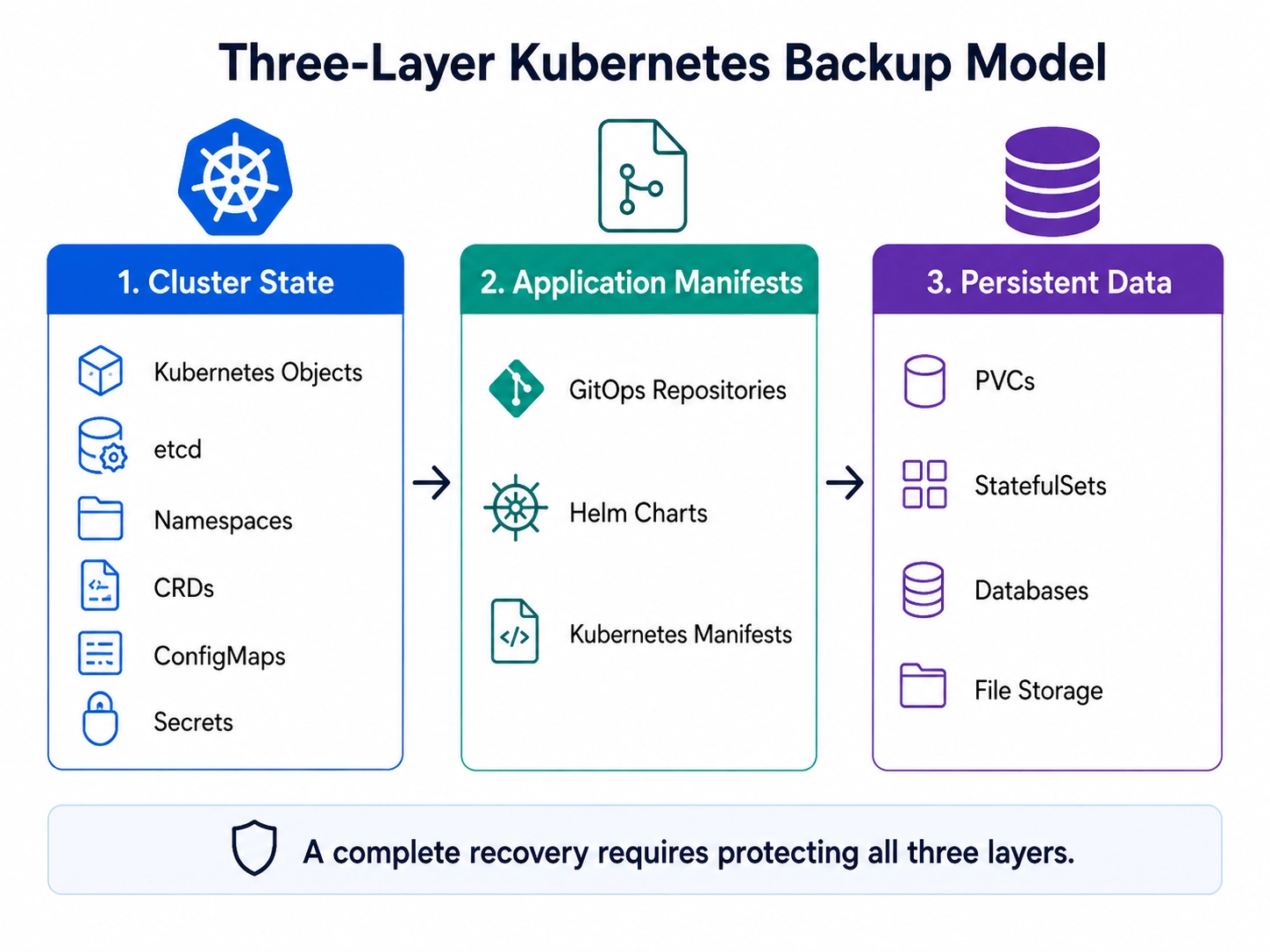
Each layer may require a different protection mechanism. The recovery strategy has to make those mechanisms work together, producing compatible recovery points that can be assembled into a functioning application.
Which Kubernetes Backup Tools Should You Use?
Kubernetes backup tools protect different parts of the recovery state. The right choice depends on what needs to be recovered, where that state lives, and what the workload requires before it can start.
If the failure is at the cluster level, the control plane state becomes the primary concern. If a workload’s configuration can be fully reconstructed from Git, that source may function as the recovery mechanism instead of a traditional backup. Stateful workloads add another requirement: persistent data must be recoverable to a point that the application can actually use.
In practice, production environments usually combine multiple approaches. The key question isn’t which tool provides the most coverage on paper, but whether the resulting recovery points can be brought together into a working application.
Why Good Kubernetes Backups Still Produce Failed Restores
A backup system can capture every resource in its configured scope and still leave a workload unrecoverable. The failure usually appears at the boundaries between storage, application state, Kubernetes resources, and infrastructure dependencies.
A useful engineering rule is that a backup that has never been restored is unverified. A successful backup job establishes that the backup operation completed. A restore exercise establishes whether the resulting artifacts can reconstruct the workload.
Crash consistency is not application consistency
A storage snapshot captures the state presented by the storage system at a point in time. Depending on the workload and snapshot mechanism, that may provide crash-consistent storage without providing an application-consistent recovery point.
Consider a database processing writes when its volume is captured. The restored file system may be intact, but the database may still need transaction-log replay or another recovery mechanism when it starts. Buffered writes and application-level state can also affect whether the recovery point is usable.
For workloads with stricter consistency requirements, teams may need database-native recovery, application-aware backups, coordinated snapshots, or procedures that control writes during backup. The right approach depends on the workload and its RPO. A stateless service recreated from Git has different requirements from PostgreSQL or another stateful system whose data changes continuously.
Restore ordering creates dependencies
Even when all required resources are available, restoring them in the wrong order can delay or break recovery.
An operator-managed application illustrates the problem. The relevant CRDs and operator may need to exist before the custom resources they manage are restored. A database-backed service may require its persistent data and credentials before application pods can connect successfully. Restoring ingress before the application is ready can expose an incomplete recovery environment to traffic.
A recovery sequence for one workload might therefore be:
- Install required CRDs and operators.
- Restore namespaces and core configuration.
- Restore Secrets or reconnect external secret providers.
- Restore persistent data.
- Start and validate stateful services.
- Start dependent application workloads.
- Restore ingress, DNS, or traffic routing.
That sequence should come from the application’s dependency graph rather than from the order in which backup artifacts happen to be available.
Important dependencies may not exist in the backup
Some recovery dependencies sit outside Kubernetes entirely.
A restored workload may need cloud IAM roles, DNS records, TLS certificates, network configuration, container registries, external databases, identity providers, KMS access, or third-party APIs. Recreating Kubernetes resources will not recreate those systems unless the recovery procedure handles them separately.
Identity and access controls deserve particular attention because the recovery environment may not have the same trust relationships as the failed environment. Service accounts must map to the expected permissions, IAM roles need to be assumable, and engineers carrying out recovery need access to backup repositories, encryption keys, and infrastructure APIs.
Backup repositories also warrant security controls because they can contain production data and Kubernetes Secrets. The recovery environment should be subject to the same access controls and Kubernetes vulnerability scanning practices used to identify workload and configuration risks in production, particularly before restored services begin receiving traffic.
At Pelotech, these boundaries are where we often find recovery gaps. The backup system captured its configured resources, but a missing permission, storage mismatch, external dependency, or untested recovery step prevented the application from returning to service.
How to Prove Your Kubernetes Recovery Strategy Works
A meaningful recovery test restores the workload into a controlled environment using the same artifacts and procedures engineers would depend on during an incident.
The target environment should reproduce the production characteristics relevant to recovery, particularly storage classes, identity, networking, operators, external integrations, and security controls. A simplified environment that omits those dependencies can produce a successful drill without testing the parts most likely to fail during an actual outage.
The exercise should also begin with defined recovery targets. If a workload has a two-hour RTO and a 30-minute RPO, the test needs to measure whether the recovered application satisfies both.
Build repeatable restore drills
Start with a specific failure scenario.
For example, assume the production cluster is unavailable, but the recovery team still has access to the backup repository, source repositories, required credentials, and a clean Kubernetes environment.
Engineers then execute the recovery procedure without relying on the failed cluster, recording the recovery point, time spent at each stage, manual intervention, and any missing or incorrectly configured dependencies.
The first drill often exposes undocumented assumptions. A backup may contain database data without the credentials needed to use it. The recovery cluster may have a different storage class. An operator may need to be installed before its custom resources. An encryption key may not be accessible from the recovery account.
Those findings should change the recovery procedure, and the next exercise should verify the changes. Over time, another engineer should be able to execute the documented recovery without relying on knowledge held only by the person who designed it.
Validate the application, not only Kubernetes
Running pods and Bound PVCs establish that Kubernetes has recreated resources. They do not establish that the recovered application can perform its normal work.
Application validation should then exercise a representative path. If the system processes orders, submit a test order. If it exposes an API, execute a representative request and verify the result. If users authenticate through an external identity provider, test the complete authentication path.
A health endpoint returning 200 cannot substitute for these checks because it may not exercise the database, identity provider, queue, or other dependency that determines whether the application is actually usable.
Measure RTO and RPO from the restore
Recovery targets should be measured from what actually happens during the drill, not inferred from backup schedules or restore-job completion.
Suppose a workload has a documented 60-minute RTO, but three drills recover the application in 95, 110, and 87 minutes. The recovery design is not meeting its target even if every backup and restore job completes successfully.
Backup frequency can similarly hide an RPO gap. Taking a snapshot every 15 minutes does not establish a 15-minute RPO if the application can only recover consistently from an older recovery point.
Recovery validation checklist
Before recording a drill as successful, verify the complete recovery path:
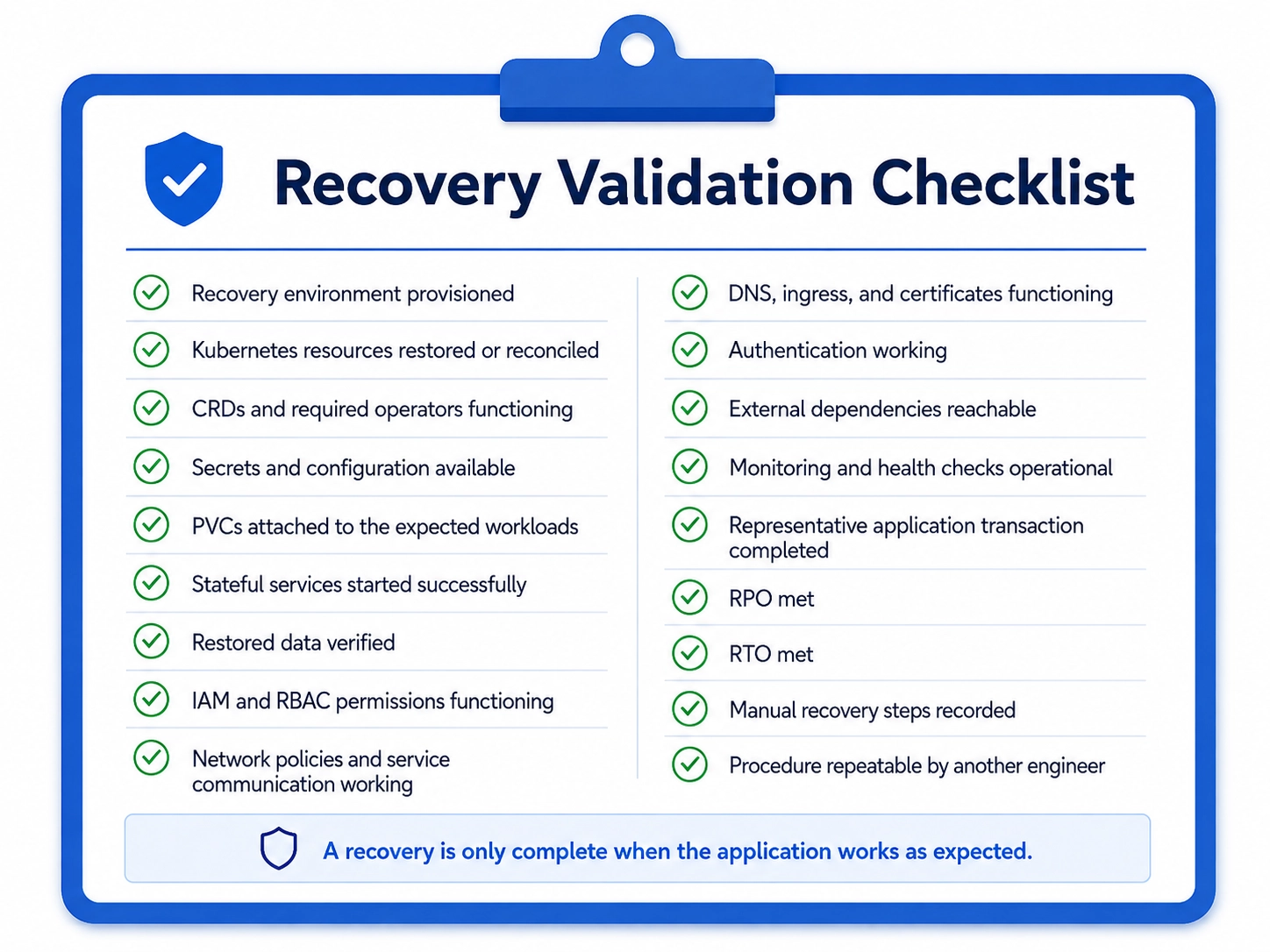
Keep the results of each drill with the recovery documentation. Operators, IAM policies, storage classes, application dependencies, and infrastructure configuration change over time, so a recovery procedure validated against an older architecture may no longer represent the production environment.
Common Kubernetes Backup and Restore Mistakes
Most recovery gaps fall into a small number of patterns that can be checked during architecture reviews and restore drills.
For each production workload, map the complete recovery chain from Kubernetes configuration through storage and application data to external infrastructure. The restore drill should exercise that chain rather than validating each backup component independently.
Kubernetes Backup Is the Foundation of Disaster Recovery
Your backups may be healthy, tested, and ready to restore. But what happens if the region containing the cluster, network, IAM dependencies, and encryption keys goes down with it?
That is where backup stops and disaster recovery begins.
A backup gives engineers something to recover from. A DR strategy answers the harder questions: Where will the workload run? Can the recovery team still access the data? Will DNS, networking, credentials, and external dependencies work in the failover environment? And how does traffic reach the recovered application?
A regional outage can expose those gaps quickly. Having a usable snapshot means little if the recovery environment cannot access it or the application cannot reconnect to the services it depends on.
A complete Kubernetes disaster recovery strategy connects tested backups to the infrastructure, failover procedures, and recovery targets needed to bring the service back.
How Pelotech Approaches Kubernetes Backup and Restore
Pelotech’s Kubernetes consulting services start recovery engagements by mapping what a production application requires to return to service and comparing those requirements with what the existing backup architecture protects. That includes Kubernetes resources, GitOps configuration, persistent data, database recovery mechanisms, storage, networking, and dependencies outside the cluster.
Recovery also has to preserve the security controls these workloads depend on. IAM roles, RBAC policies, Secrets, encryption keys, and backup repository access must work in the recovery environment without weakening production controls.
The restore process is then tested against a realistic recovery environment. Pelotech checks whether the application can actually run, how much manual intervention recovery requires, and whether the measured RTO and RPO match the agreed requirements.
In one Series C SaaS engagement, a disaster drill produced a 14-hour recovery time against a documented two-hour RTO. The individual backup systems worked, but network configuration and IAM dependencies failed during regional recovery because the complete recovery path had not been validated.
After Pelotech assessed and redesigned the recovery architecture, the company had a validated 45-minute recovery time.
Teams evaluating outside support for similar recovery work can use experience across Kubernetes architecture, stateful workloads, security, and disaster recovery as criteria when comparing the best Kubernetes consulting services.
Conclusion
Successful backup jobs show that backups were created, not that the application can be recovered. A restore test is where the real gaps appear: data, dependencies, access, and recovery steps all have to work together.
Until the team has run that process against its RTO and RPO, the backup strategy still contains assumptions that have not been tested.
