


The most expensive Kubernetes deployments I've seen weren't caused by bad code. They were caused by the right code shipped the wrong way.
I've watched it happen quite a few times. A team pushes a new feature using a Recreate strategy. The feature passed QA, staging looked clean, and leadership was expecting a conversion spike. Yet within minutes of hitting production, page loads slow and carts start timing out. The feature was fine. The deployment left no room to limit the damage or roll back quickly, and every extra minute online meant more lost revenue.
The strategy wasn't matched to what the business could afford to risk.
This guide is about which strategy fits your traffic shape, your release cadence, your team's operational maturity, and what failure actually costs you. Every strategy in Kubernetes makes a different set of tradeoffs across downtime risk, rollout speed, rollback complexity, and infrastructure cost. Before getting into when and why to use each one, here's how they compare at a glance.
1. Recreate
Recreate is the simplest deployment strategy Kubernetes offers. All running pods are terminated before new ones spin up, with no overlap between versions. For however long startup takes, your service is offline.
That downtime is the tradeoff, and in the right context, it's worth accepting.
This strategy makes sense when you can plan around downtime and don't need the complexity of running two versions simultaneously:
- Low-traffic internal tools and non-customer-facing systems
- Workloads where version overlap is genuinely dangerous, like a singleton scheduler or a service that assumes exclusive file access
- Schema migrations that can't be made backward compatible
An internal manufacturing dashboard used only at shift change is a good example. If the app runs for 10 minutes every few hours, scheduling a deployment between those windows is a rational call. You avoid parallel environments and traffic-splitting infrastructure, which keeps both cost and complexity low.
The tradeoffs are:
- Predictable downtime window
- Simple rollback
- Low infrastructure cost
- Startup time is your exposure window
That last point catches teams off guard more than it should. Container start time isn't just image pull speed. It includes init containers, config and secret mounting, JVM warmup, readiness gates, cache priming, and any bootstrap tasks baked into startup. Underestimate that and your downtime runs longer than anyone told the stakeholders to expect.
2. Rolling Update

A Rolling Update replaces old pods with new ones gradually. Kubernetes updates in batches so the service keeps serving traffic throughout the rollout, which makes it the default approach for teams who want zero-downtime deployments without paying for a separate environment.
It works well for most general-purpose workloads: web apps, APIs, background services. Customers don't see a hard outage, and engineering doesn't need to double infrastructure to release safely.
The catch is the mixed-version window.
For some period during the rollout, old and new versions run simultaneously. If your release includes breaking changes in API fields, message formats, schema updates, or cache key changes, those two versions can produce bugs that only exist during deployment. They're often the hardest to diagnose because they're intermittent, disappear once the rollout finishes, and leave you with logs that don't tell a clean story.
Rollback is also more nuanced than it looks. If issues surface 20 minutes in, after some pods updated and downstream services cached responses from the new version, reverting the deployment won't always restore a clean state. You may need to reason about partial writes, in-flight sessions, or consumers processing events from the new version.
Resource pressure is another failure mode worth knowing. Kubernetes may temporarily run extra pods during a rollout depending on your maxSurge and maxUnavailable settings. If you're already near CPU or memory limits, that extra capacity can trigger throttling, evictions, or autoscaling delays at exactly the wrong moment.
3. Blue/Green
A Blue/Green deployment runs two environments in parallel. Blue serves all production traffic while you validate green, then you switch in one controlled cutover. If anything goes wrong, routing traffic back to blue takes minutes.
This strategy earns its place when the business impact of failure is high and rollback speed is non-negotiable:
- Systems with strong availability requirements
- Regulated environments where you need a clean audit trail and a clear release boundary
- Payment flows, identity services, healthcare portals, and anything where downtime directly costs money or trust
Cost is the main tradeoff. For the duration of the release window, you're running two production-capable stacks: duplicate node capacity, duplicate deployments, and potentially duplicate supporting services. Both sides need to be capable of handling full traffic during cutover, even if only one is actively serving it.
State management is where most blue/green implementations get complicated. Both environments pointing to the same database means schema changes must be backward compatible during the overlap. Separate databases introduce migration and synchronization challenges, along with a deliberate cutover plan for sessions, queues, caches, and idempotency.
For stateless services, blue/green is clean and straightforward. Add stateful dependencies and the complexity grows considerably.
The cost creep is what surprises teams most, and it's rarely just the app pods. It's everything around them:
- Extra nodes sized for peak capacity
- Duplicated ingress and controller capacity
- Duplicated observability load
- Parallel data stores when validation requires it
4. Canary
A Canary deployment routes a small percentage of live traffic to a new version, then expands gradually if metrics stay healthy. Rather than a single cutover, the rollout becomes a series of deliberate checkpoints: proceed, pause, or roll back.
This is the right model when small failures carry real cost. A latency regression that quietly reduces checkout conversion. An auth bug that only surfaces under specific conditions. A memory leak that won't show up until you're at 30% traffic. Canary gives you a way to find those problems before they reach everyone.
A high-traffic insurance claims API is a good example. Unit tests and staging can only tell you so much. Real production traffic brings unusual payloads, retry storms, actual concurrency, and dependency timeouts that don't exist at a smaller scale. Starting at 1% lets you watch error rates and latency closely before expanding to 5%, 10%, 25%, 50%, and eventually 100%.
The tradeoffs are complexity and discipline. Canary requires:
- Traffic routing that consistently sends a defined percentage of users to the new version
- Observability good enough to tell the difference between normal variance and something that will become an incident at 50%
- Metrics broken down by version: error rate, p95/p99 latency, saturation indicators, and customer-impact signals
For a deeper look at how this connects to Kubernetes cost optimization, the tradeoffs are worth understanding before committing to a canary-based release process.
5. Shadow
A Shadow deployment sends a copy of real production requests to a new version of a service while the current version continues handling all user-facing traffic. The shadow processes the requests but its responses go nowhere. You're observing behavior under real conditions without exposing customers to the result.
Shadow makes sense when staging environments can't tell you what you need to know. Major architectural shifts fall into this category:
- Moving from a monolith to microservices
- Swapping a database engine
- Rewriting a pricing service or recommendation engine
- Changing a critical dependency chain
These are changes where passing tests in staging tells you almost nothing about behavior under real production load. Teams working through Kubernetes security requirements during major transitions also find shadow useful for validating behavior before any user-facing switch.
The tradeoffs come down to cost and side effects. Running two paths at production load isn't cheap. More critically, the shadow service needs to be prevented from acting on the world. If it writes to a database, calls a payment API, or triggers an email, you've corrupted real state or created duplicate records, silently, while you thought you were just observing. Shadow systems need guardrails from day one: read-only modes, stubbed external integrations, or isolated write paths that can't reach production systems.
Interpreting the results is also harder than most teams expect. You need:
- Distributed tracing and structured logging across both paths
- Correlation IDs to match shadow requests to live ones
- Tooling to compare outputs, latency distributions, and error patterns at scale
- A clear definition of what "equivalent behavior" actually means for your system
6. A/B Testing
A/B testing runs two versions simultaneously and routes different user segments to each one. The goal is measuring whether a change produces better business outcomes: conversion rate, feature adoption, retention, revenue per user.
It's the right tool when a product team needs evidence before committing to a full rollout:
- An EdTech platform testing a new onboarding flow with 10% of new teachers to see whether class creation completion improves
- A SaaS product testing a redesigned billing UI to see whether failed payments decrease
- A marketplace testing a ranking algorithm change to validate whether it increases purchases without hurting long-term retention
Running a clean A/B test is harder than it looks. You need deterministic user assignment so the same user always sees the same variant, clean segmentation so the groups are actually comparable, and metric design specific enough that you're measuring the change and not variance in user behavior. Skip one and your conclusions don't hold up.
Where teams consistently run into trouble is coupling experiments with operational rollouts. If the experiment variant is also the newer build, a performance regression contaminates your business results. You can't tell whether conversion dropped because of the product change or because the new build introduced a latency problem. The two questions need to be kept separate.
The confusion we see most often is teams running what is functionally a canary and calling it an A/B test, or the reverse. Routing some percentage of traffic to a new version and watching error rates is canary, even if it's 50/50. Routing by user segment and evaluating conversion is A/B, even if both versions are perfectly stable.
How to Choose the Right Strategy for Your Situation
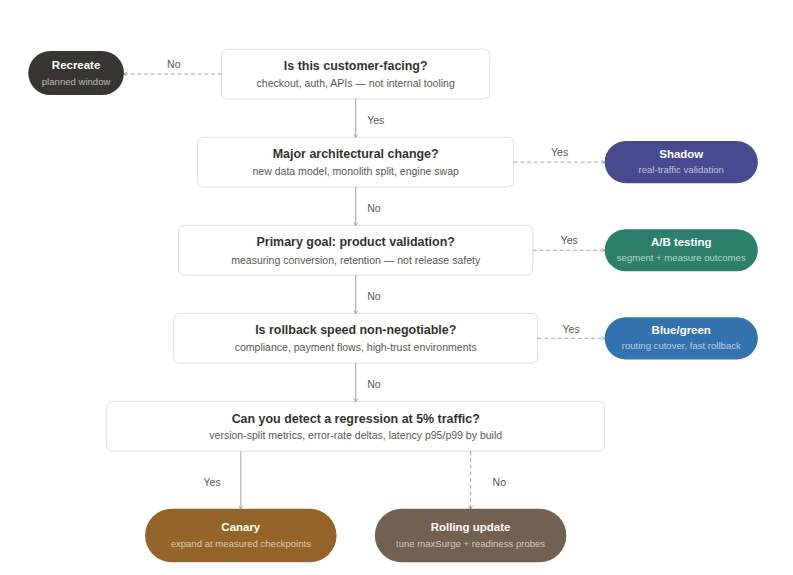
Before recommending a strategy to a customer, we work through a set of questions about their business:
What does downtime actually cost you?
Recreate is valid for internal tooling but the wrong fit for customer-facing paths like checkout, authentication, or core APIs. For those, the decision sits between rolling updates, canary, and blue/green, based on how much risk you can tolerate during rollout and how fast you need to recover when something goes wrong. Your Kubernetes disaster recovery posture is part of that calculation.
How fast do you need to be able to roll back?
Blue/green is the cleanest answer when rollback speed matters more than infrastructure cost. Rollback is a routing change, not a rebuild. That difference reduces incident duration, support load, and revenue impact when a release goes sideways. The cost is running parallel capacity and maintaining the discipline to keep both environments truly equivalent.
Are you running high-traffic consumer systems or internal tooling?
For high-traffic consumer systems, canary often gives you the best balance between safety and cost. You don't need to duplicate everything, but you do need observability good enough to make real decisions at each checkpoint. For internal tools used by one department, a planned five-minute window is often cheaper and simpler than building a progressive delivery pipeline.
Are you making a major architectural change?
Shadow is worth considering when your primary concern is how the new system behaves under real load, not whether it passes tests. It's a risk discovery tool, not a release mechanism. Most teams aren't ready for it without the right observability stack already in place. If you're also working through Kubernetes vulnerability scanning as part of a larger migration, that's usually a signal the change warrants shadow-level validation.
Is your primary goal product validation or release safety?
A/B testing is built for product validation, but it needs clean experimental design to produce conclusions you can act on. Using it as a release safety mechanism muddies the data. For teams evaluating GitOps-based rollout tooling, the ArgoCD vs Flux comparison is worth reading before you commit to a traffic management approach.
Conclusion
Most deployment failures come down to a strategy that wasn’t matched to what the business could afford to risk.
The teams that consistently get this right have usually worked through it the hard way, across multiple incidents, and built the discipline and observability to back it up.
If you want to make that call with the benefit of having seen it play out across dozens of engagements, talk to our Kubernetes consulting team.
