

.webp)
Teams running Ingress NGINX in production are increasingly evaluating migration paths as Kubernetes networking evolves toward Gateway API.
For many organizations, the challenge is not just selecting a Gateway API implementation, but designing a migration strategy that minimizes operational risk during cutover.
Most engineering teams know they need to migrate, but they are short on the bandwidth to do a proper evaluation, unsure which Gateway API controller is the right long-term bet, and aware that a rushed cutover will drop production traffic the moment DNS TTLs disagree with reality.
This piece is a case study of an Ingress NGINX migration we recently ran for a customer on AWS. It walks through how we picked Envoy Gateway, how we tested the migration on our own infrastructure first, why our first successful cutover was not good enough, and the weighted DNS approach that finally got us a clean zero-downtime result.
If you are working through this migration yourself, the goal here is to save you the discovery work we have already done.
Why Migrate from Ingress NGINX to Gateway API
Ingress NGINX controller is one of the most widely deployed controllers in the Kubernetes ecosystem, and plenty of production clusters are running it right now.
With no security patches, no new features, and an Ingress API frozen in place, Gateway API is the logical next step. It is a more expressive specification that replaces annotations with dedicated resources for the same concerns.
Ingress expresses routing through annotations that are vendor-specific, unvalidated, and effectively locked to whichever controller you chose. Move to a different controller and much of that configuration does not come with you. Gateway API replaces those annotations with typed resources that are validated and portable across conformant controllers, so the routing logic you write is no longer hostage to a single implementation. In a migration driven by one controller reaching the end of life, not being locked into your next controller the same way is the point.
In a recent customer engagement on AWS, we evaluated several Gateway API implementations and migration approaches before settling on Envoy Gateway. Because we leverage Ingress NGINX in Foundation, our opinionated GitOps Kubernetes platform, this migration was just as relevant to us as it was to our customer.
Pretty much all migration guides we read while researching this work stop at “traffic moved.” That is a fine outcome if you are doing a demo. In production, getting traffic moved without dropping in-flight requests is a separate problem, and it is the one the rest of this article is about.
The Security Clock is Speeding Up in the AI Era
In mid-2026, Calif researchers used OpenAI's Codex agent to find a remote denial-of-service exploit called the "HTTP/2 Bomb." Neither technique it combined was new as both had been public for nearly a decade.
What was new was the discovery method: Codex read the source of nginx, Apache, Envoy, and IIS, recognized that the two patterns could be chained into a single amplification attack, and produced working proof-of-concept code, a combination no human had assembled, surfaced in an afternoon.
This matters for Ingress NGINX because of its position. The controller runs a pinned, unmaintained version of NGINX. When upstream NGINX patched the HTTP/2 Bomb, actively maintained projects pulled the fix. Ingress NGINX has no such path, every upstream fix from here on is one it won't receive, and the patched/unpatched gap keeps widening.
More broadly, the commit-to-exploit path is collapsing. Once a fix is public, its diff is enough for a capable model to reconstruct the exploit. Attackers work on that same timeline now, which means running unmaintained software in your traffic path is a faster-decaying liability than it was a year ago.
That turns migration from a compliance checkbox into a question of response speed. Real defense against a threat landscape moving this fast means being able to ship patches quickly, which requires software that's still maintained and infrastructure built to absorb change. Ingress NGINX offers neither.
Migrating a Customer From Ingress NGINX to Envoy Gateway
Picking the Right Gateway API Controller
The first step was getting our hands dirty in a low-stakes environment. We used Kind — Kubernetes IN Docker — which lets you spin up a local Kubernetes cluster inside Docker containers. It is a great way to prototype and experiment without touching real infrastructure, and we used it throughout the evaluation.
We started by evaluating options using a project called ing-switch. It is a migration tool that scans a cluster for Ingress resources across all major controllers, maps annotations with impact ratings, and generates migration manifests, either through a CLI or a visual UI. It gave us a useful starting point for understanding what we were working with and what a migration would actually involve.
One thing we wanted to explore was whether a single controller could satisfy both Ingress and Gateway API simultaneously. The idea was that a dual-mode controller could serve as a bridge, letting us run both side by side during a transition rather than doing a hard cutover.
We cast a wide net initially, including projects outside the CNCF ecosystem. As the evaluation progressed, CNCF alignment emerged as a meaningful filter. The Cloud Native Computing Foundation hosts the most critical projects in the Kubernetes ecosystem, including ArgoCD, cert-manager, ExternalDNS, and many others that make up the backbone of Foundation.
When making a long-term infrastructure decision for a customer, we focus on projects that have earned community consensus and meet CNCF's bar for production readiness.
Beyond CNCF status, we cared about a few specific things:
- Annotation parity with what we were already using
- Support for real production requirements like mTLS and request buffering
- A controller that honored Gateway API's model of dedicated resources, rather than a sprawl of annotations
Here is a comparison between the different Gateway API controllers we considered against those criteria:
Note on Envoy Gateway contributor data: the broader Envoy project has a wide contribution; Envoy Gateway itself currently has 4 contributors with one organization at 51% or more.
Envoy Gateway came out on top. It is a CNCF project, the spec is solid, and the CNCF runs it on its own infrastructure. Meeting CNCF graduation criteria gives us confidence in tooling decisions, and knowing the people behind those criteria made the same selection internally is an even stronger signal.
Testing Envoy Gateway on Our Own Infrastructure First
With Envoy Gateway selected, the next question was where to test it.
Before taking anything to our customer, we wanted to prove it out on our own infrastructure first. We built an Envoy Gateway component wired up to an AWS Network Load Balancer and leaned on two other Foundation components we already had confidence in: ExternalDNS for automatic DNS record management and cert-manager for TLS. The integration points were familiar, which let us focus on the migration itself.
For a proving ground, we landed on an internal Goldilocks instance. Goldilocks is a tool for generating resource requests and limit recommendations for Kubernetes workloads. Its Helm chart supports both Ingress and Gateway API, which meant we could run both simultaneously without any application-level changes. It is also a fairly simple application to deploy, which makes it an ideal candidate for working through the mechanics of a migration without unnecessary variables.
To monitor the cutover, we wrote a simple shell script that polled our endpoint and piped the output to both the terminal and a log file using tee. This gave us a clear, reviewable record of HTTP status codes throughout the process.
A Successful Gateway API Migration, But Not Good Enough
The first cutover went smoothly enough. We stood up the Envoy Gateway HTTPRoute alongside the existing Ingress, watched our polling script, and made the switch. There was one manual step worth noting: because we manage our clusters with ArgoCD and do not use the prune option, the old Ingress resource did not get cleaned up automatically. We had to delete it by hand through Argo. Not a big deal, just something to account for in a real migration plan.
The migration worked. When we reviewed the log file, however, there was a window of downtime during the cutover. The culprit was DNS. When you swap an A record, you are at the mercy of the TTL that was set on the old record. Until that TTL expires, customers are still resolving to the old address. If the old Ingress is gone, those requests go nowhere. We had done the migration, and we had not done it cleanly.
That was not good enough for us. Most migration guides end here. Ours did not, because getting traffic moved is one thing, but getting it moved without dropping a single request is another. We went back to the drawing board.
Achieving Zero Downtime With Weighted DNS
The problem with our first attempt was sequencing. We removed the old Ingress before DNS had a chance to catch up. Traffic needed a stable destination during the transition window.
We landed on weighted DNS records via ExternalDNS and AWS Route 53. Instead of a hard cutover, we could run the Ingress and the HTTPRoute simultaneously, each registered with the same hostname but with different weights. By setting the Ingress weight high and the HTTPRoute weight to zero, the HTTPRoute would be live but receive no traffic, effectively inert. Once we were confident everything stood up correctly, we could swap the weights and move traffic over without creating or deleting any DNS records.
ExternalDNS watches for an annotation on both Ingress and HTTPRoute resources and manages the weighted Route 53 records automatically. The Ingress annotation looked like this:
external-dns.alpha.kubernetes.io/aws-weight: "100"And the HTTPRoute started at:
external-dns.alpha.kubernetes.io/aws-weight: "0"Both resources were pointing at the same hostname, both registered in Route 53, with all traffic flowing through the Ingress. When we were ready to cut over, we swapped the weights:
# Ingress
external-dns.alpha.kubernetes.io/aws-weight: "0"
#HTTPRoute
external-dns.alpha.kubernetes.io/aws-weight: "100"
The polling script kept running throughout the cutover and confirmed the result: not a single failed request. We also verified that requests were now passing through the new AWS load balancer and routing through the HTTPRoute as expected.
Worth noting: this approach also makes rollback trivial. If anything looks wrong post-cutover, swap the weights back. There is no DNS record to recreate, no resource to redeploy, and the rollback propagates the same way the cutover did. The weighted DNS pattern is also controller-agnostic. We used it for Envoy Gateway, but the same approach works with any Gateway API implementation that ExternalDNS can manage.
When Weighted DNS Isn't the Right Tool
Our weighted DNS approach worked because our ingress was external-facing, with a public Route 53 hosted zone that ExternalDNS could manage weighted records against. That's where most of the migration risk concentrates, so it's the case worth solving first. But it's not universal.
We also run an internal ingress path, scoped to the VPC, alongside the external one. Weighted records aren't always available on that internal side the way they are on a public hosted zone, and without weights, the parallel-hostname cutover above doesn't apply.
For the internal path, the alternative is a parallel-cluster migration: instead of running both controllers side by side in the same cluster, stand up a new cluster with the Gateway API already in place and shift traffic at a higher layer, often through an existing proxy tier. It's a heavier lift, with more coordination overhead, but it sidesteps the internal-DNS limitation entirely.
Budget time after the move to reconcile 4xx responses, mapping the Ingress NGINX annotations you relied on to their Gateway API equivalents through the right backend and client traffic policies. The same annotation inventory that started this migration is the tool to run again here, applied to the new cluster before any real traffic moves.
Which path applies depends on your topology. For external-facing traffic, weighted DNS is the lower-risk option by a wide margin. If a meaningful share of your traffic runs through internal ingress, plan for both paths separately.
What Production Actually Surfaced
The Goldilocks test gave us confidence in the mechanics. Production then introduced requirements that had not surfaced in our internal testing.
Some of those requirements we had already addressed in kind. Our customer needed mTLS with certificate forwarding, as well as request buffer limiting. We solved both cleanly during our evaluation phase, which gave us real confidence going into the customer engagement. Having worked through them in kind meant we did not discover them mid-migration.
What we did not fully anticipate was the multi-namespace model. Our customer runs multiple namespaces per cluster to represent different environments, which is a common and reasonable pattern. The challenge is that prior to Gateway API 1.5, hostnames must be defined at both the Gateway level and the HTTPRoute level.
The Gateway is a cluster-level resource, typically owned by a platform or infrastructure team. The HTTPRoute is an application-level resource, owned by developers.
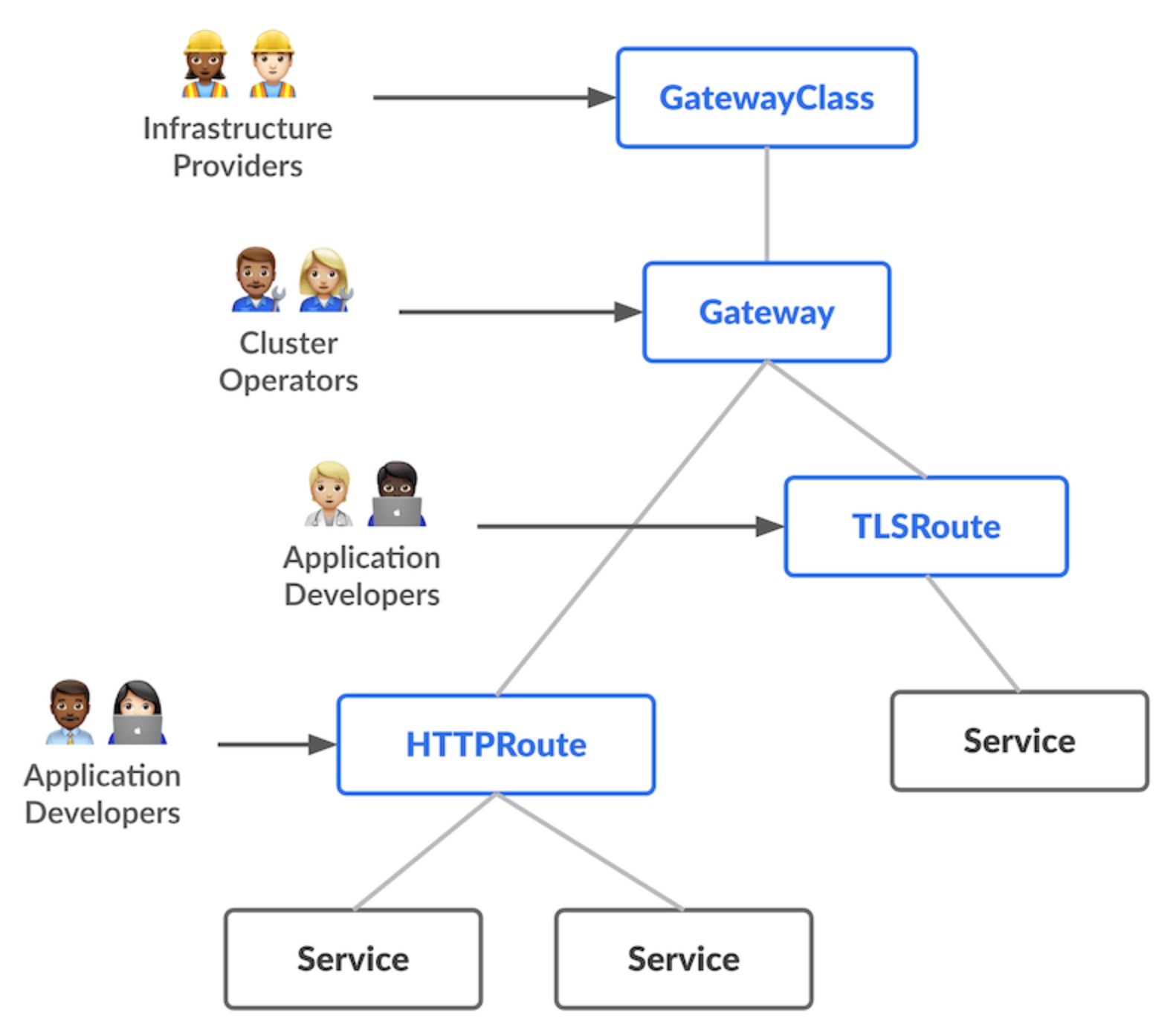
When hostname configuration lives at the Gateway level, you are pulling an application concern up into infrastructure. That breaks exactly the separation of concerns that Gateway API is supposed to deliver.
At single-namespace scale it is tolerable. Across multiple namespaces representing distinct environments, it becomes a real problem. Gateway API 1.5 is a stable release and addresses this directly with the introduction of ListenerSet. The issue is that controllers have not caught up to the spec yet.
Where Gateway API Goes From Here
Gateway API 1.5 shipped with ListenerSet, a new resource type designed to enable this separation of concerns. ListenerSet allows application teams to define their own listeners without touching the Gateway resource itself. Infrastructure concerns stay at the infrastructure level, and application concerns stay at the application level.
Envoy Gateway has implemented ListenerSet, currently in a release candidate, and the stable release is expected within days. We are already testing the RC behind a feature flag and are ready to move quickly once it lands. We have confidence in the Envoy Gateway team and are looking forward to implementing this once the stable release lands, as it will meaningfully improve how we separate infrastructure and application concerns across namespaces.
Recap: Doing Your Ingress NGINX Migration Right
The pressure to migrate off Ingress NGINX is real, and every month a team stays on an EOL controller built on a feature-frozen API is a month further from where Kubernetes is going. The urgency is valid, and it cannot be an excuse to cut corners or implement a suboptimal solution.
What we set out to do was migrate a customer with zero downtime, on a solid long-term foundation, without shortcuts. The weighted DNS approach gave us the clean cutover we wanted. Envoy Gateway gave us a controller we can stand behind. The harder lesson is that the difference between a migration that moves traffic and one that drops zero requests comes down to the steps most guides skip.
If Ingress NGINX is in your stack, now is a good time to start planning. The infrastructure decisions you make today shape how cleanly you can adopt what comes next.
